 How-to
What Should You Post on Wedding Day Social Media?
Last Updated: October 28, 2026
Quick Summary
Plan your wedding day social media with a one-page document built two to three weeks before the wedding that names who captures and posts what, when, and where. Post live moments to Stories, a short recap to Reels or TikTok, and polished highlights to your feed, staggered across days.
- Build your social media plan two to three weeks before the wedding, not the night before.
- Name one person to capture content and one person to post it.
- Post nothing live during the ceremony; save that content for the cocktail hour window.
- Post a short Reel within 24 hours, when guests are still most engaged.
- Charge two phones, bring a power bank, and enable cloud backup on the capture device.
Table of Contents
- Why Wedding Day Social Media Needs a Plan, Not Just a Phone
- Wedding Day Content Ideas That Capture the Real Moments
- Building Your Wedding Social Media Plan Before the Day Arrives
- Wedding Content Creator vs Photographer: Who Captures What
- Setting Guest Social Media Expectations Without Being a Dictator
- Wedding Instagram Captions and Platform Tips That Actually Get Shared
- Backup, Permissions, and the Technical Side Nobody Plans For
- Hand Off the Hashtag and the Phone: Next Steps with CANA EVENTS
- Frequently Asked Questions
Why Wedding Day Social Media Needs a Plan, Not Just a Phone
Your wedding day social media will happen whether you plan it or not. Guests will post, tag, and share. The question is whether the story told online looks like the day you actually had.
Most couples treat posting as an afterthought. That's the mistake. A wedding social media plan is a simple document that names who posts what, when, and where. It takes an hour to write and saves a dozen awkward moments later.
At CANA EVENTS, we've coordinated content and logistics for more than 20 weddings. Here's the throughline for everything below: plan the content so you can forget the phone.
What you'll get from this guide:
- Real wedding day content ideas, hour by hour
- How a content creator differs from a photographer
- Guest posting rules that don't feel bossy
- Caption and platform tips that get shares
- The backup and permission details nobody plans for
Wedding Day Content Ideas That Capture the Real Moments
Wedding day content ideas can capture what the day felt like, not just what it looked like. Candid moments, real reactions, and small details offer alternatives to posed shots. But "capture the candid moments" is advice every guide gives. What most guides skip is the practical part: what to shoot, when to shoot it, and when to post it.
Here are ideas for an hour-by-hour content shot list, with capture notes and posting windows. Adjust the times to your timeline.
Morning Prep (roughly 8 a.m. to noon)
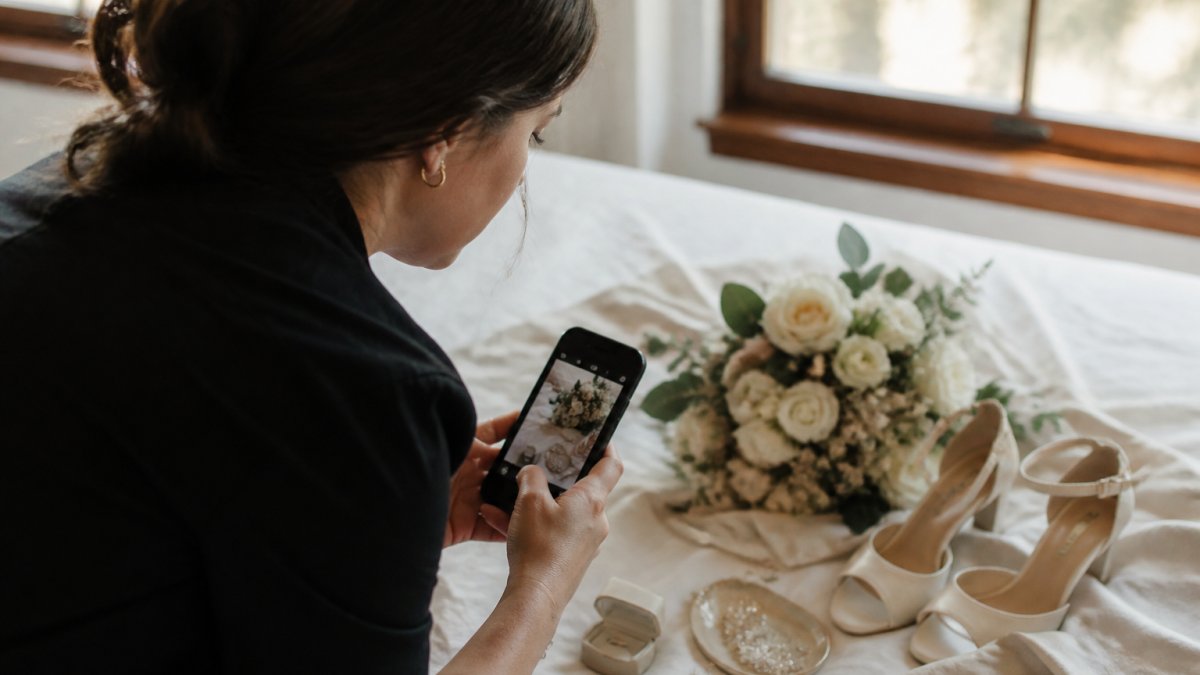
- The details flat lay. Dress on its hanger, rings on a windowsill, invitation suite, shoes, jewelry, perfume bottle. Shoot in window light, not overhead light. Post to Stories as a "getting ready" sequence.
- Hair and makeup in progress. Hands at work, the mirror reveal, the robe or getting-ready outfit. Short vertical clips are one option here.
- Letters and gifts. The couple reading notes to each other, the gift exchange, the reaction.
- First look with a parent or bridal party. These reactions often outperform the couple's first look on social because guests have not seen them.
Posting window: one or two Stories before the ceremony, saved to a highlight later.
Ceremony (roughly 3 to 5 p.m.)
- The walk down the aisle. Shoot from the back for the full scene, then from the side for the reaction at the front.
- Vows and rings. Capture the audio if you can. A 15-second clip of a vow line with captions is one possible format.
- The first kiss and the exit. Get the wide shot and the guest reaction in the same frame.
- Guest reactions. Grandparents wiping tears, friends laughing. These are possible shots for a recap.
If you are planning an unplugged ceremony, this is the block where the content lead does the capturing and guests keep phones away. Post nothing live during the ceremony; save it for the cocktail hour window.
Cocktail Hour (roughly 5 to 6 p.m.)
- Candid guest moments. Hugs, toasts among friends, the bar, the appetizers.
- The couple's first moments alone. Many couples steal five minutes after the ceremony. That is one possible moment to capture.
- Detail shots of the reception space before guests enter. Centerpieces, place cards, the cake, the band setup.
Posting window: consider a live Story sequence. Guests are together, phones are out, and the ceremony content is still fresh.
Reception (roughly 6 to 10 p.m.)
- Grand entrance and first dance. Shoot wide for the room and tight for the couple's faces.
- Toasts. Capture the speaker and the reaction at the head table in the same clip.
- Parent dances and cultural traditions. If you have a hora, a dollar dance, a tea ceremony, or a second-line, assign someone specifically to capture it.
- Dance floor. Short clips of the crowd, not long wide shots. You could use 10-second cuts.
Posting window: one Reel or carousel after the first dance, then save the rest for the next-day recap.
After the Day
- The next-morning recap. A 30- to 60-second Reel using the best clips from each block.
- Guest photos. Collect them through a shared album link or hashtag and repost the best with credit.
- Vendor tags. Tag the photographer, venue, florist, and band when you post their work.
What to Skip
Not every moment needs to be content. Getting-ready chaos, private conversations, and anything a guest asks you not to share should stay off the feed. The shot list is a guide, not a quota. A content lead who knows when to put the phone down is more valuable than one who captures everything.
Building Your Wedding Social Media Plan Before the Day Arrives
A wedding social media plan is a one-page document that lists your content goals, your posting schedule, who captures what, and your rules for guests. Build it two to three weeks before the wedding, not the night before.
Here's how we'd build it:
- Pick your goal. Do you want a live story for guests, a polished recap, or both?
- Choose your leads. Name one person to capture and one to post.
- Draft a shot list. List the moments you can't miss.
- Set the posting windows. Before, during, and after the wedding.
- Write guest rules. A short note on your invite or website.
- Agree on captions and hashtag. One shared tag for all posts.
- Plan a backup. Two devices, cloud storage, and a charging plan.
Keep it short. A plan nobody reads is worse than no plan at all.
Wedding Content Creator vs Photographer: Who Captures What
A wedding content creator vs photographer question can come up for couples. The short answer: they do different jobs.
| Role | Main Output | Turnaround | Best For |
|---|---|---|---|
| Photographer | Edited high-res photos | Weeks | Album, prints, keepsakes |
| Videographer | Edited film | Weeks to months | Full-story video |
| Content creator | Vertical video, Stories, Reels | Same day or next day | Real-time sharing |
A photographer and videographer focus on photography and video. A content creator may focus on social media content.
Your content creator needs to know your timeline so they're in the right place at the right moment. CANA EVENTS manages wedding timelines and vendor communication.
Setting Guest Social Media Expectations Without Being a Dictator
Guest social media rules work best when they're light. Tell people what you'd love, not what they can't do.
Try these approaches:
- Encourage a shared hashtag. Print it on a small sign or menu card.
- Ask for an unplugged ceremony. A short note before the ceremony is enough. Many couples choose a phone-free ceremony and guests respect it.
- Create a designated social media space. A photo spot with good light gives guests a place to post.
- Invite guest posts. Ask a few friends to capture candids and tag you.
The key is tone. A request reads better than a rule. "We'd love to see your photos, but please keep phones away during the ceremony" lands far better than a list of bans.
Wedding Instagram Captions and Platform Tips That Actually Get Shared
Good wedding Instagram captions do one thing: they sound like the couple, not a brand. Write a few captions in advance so you're not scrambling on the day. But captions are only half the job. The other half is choosing the right platform, format, and posting window, and making the content accessible to everyone who wants to see it.
Caption Starters That Work
- "The moment we'd waited for."
- "Best day, best people."
- "Still not over this."
- "POV: you married your favorite person."
- "A few of our favorite frames from the best day."
Keep captions short, specific, and in your own voice. One line plus a tag is usually enough. Save the longer story for the next-day recap post.
Platform-by-Platform Publishing Guide
| Platform | Best Format | Best Posting Window | Notes |
|---|---|---|---|
| Instagram Stories | Vertical photo or 15-second clip | During cocktail hour and reception | Use polls, questions, and countdowns to keep guests engaged. Save to a highlight. |
| Instagram Reels | 15- to 60-second vertical video | Within 24 hours of the wedding, then again 3 to 5 days later | Hook in the first two seconds. Use trending audio only if it fits the tone. |
| Instagram Feed | Carousel of 5 to 10 photos | 1 to 3 days after the wedding | Lead with the strongest image. Tag vendors in the first slide. |
| TikTok | 15- to 30-second vertical video | Same day or next day | Native text overlays and a casual voice perform better than polished edits. |
| Photo album or short video | 1 to 2 days after the wedding | Better reach with older relatives. Tag family members. |
A simple rule: post the live moments to Stories, the short recap to Reels or TikTok, and the polished highlights to the feed. Don't post the same clip to every platform on the same day; stagger them so each post has room to breathe.
Accessibility and Inclusive Content
Most wedding social media guides skip accessibility. A few small habits make your posts usable for more guests and family members:
- Add captions to every video. Instagram, TikTok, and Facebook all offer auto-captions; review them before posting.
- Write alt text on feed photos. Describe who is in the photo and what is happening, not just "wedding photo."
- Use readable on-screen text. High contrast, large font, and no text over busy backgrounds.
- Represent the whole guest list. Include grandparents, kids, and family members with disabilities in the recap, not just the bridal party.
- Avoid flashing or strobing edits. They can be uncomfortable for guests with photosensitivity.
Measuring Success Without Making the Day Performative
You do not need a viral post to call the day a success. Pick two or three lightweight measures and check them a week later:
- Saves and shares on your recap Reel, which show the content mattered to people.
- Comments from guests and family, especially ones that mention a specific moment.
- Story replies and DMs from people who could not attend.
- Guest photo submissions through your shared album or hashtag.
Skip the follower-count obsession. A wedding post that gets 40 saves from close friends and family is doing its job. The goal is a record of the day your people can return to, not a performance for strangers.
One insider tip: post a short Reel within 24 hours of the wedding. Early posts tend to get the most views because your guests are still engaged. The Instagram creator tools guide covers how Reels and Stories reach new audiences.
Backup, Permissions, and the Technical Side Nobody Plans For
The technical side is where content plans quietly fall apart. Two things matter most: permission and backup.
On permissions, get consent before posting guests or vendors in close-up shots. Respect anyone who asks not to be filmed. For guidance on sharing photos of others, see the FTC guidance on endorsements and testimonials, which explains why honest, permission-based sharing matters.
On backup, follow this simple workflow:
- Charge two phones and bring a power bank
- Enable cloud backup on the capture device
- Shoot and upload in small batches, not all at once
- Keep a shared folder for all raw footage
- Have a second person ready to post if the lead is busy
Watch out: relying on one phone with no backup is the most common way couples lose footage. A dead battery at the first dance can't be undone.
Hand Off the Hashtag and the Phone: Next Steps with CANA EVENTS
Planning content and handing off the phone can help couples focus on celebrating.
That's where we come in. CANA EVENTS offers day-of coordination and content creation. We manage timelines, vendor communication, cultural traditions, setup and teardown, and unexpected issues.
Ready to enjoy your own day? Check your date and get a quote from CANA EVENTS.
Frequently Asked Questions
What should you post on social media on your wedding day?
Focus on moments, not a perfect feed. Strong wedding day social media posts include getting-ready details, first-look reactions, ceremony highlights, candid guest moments, and a short reception clip. Stories work well for real-time updates throughout the day, while Reels and feed posts can wait until you have a few standout clips. Keep captions short and personal, and save the polished recap for the week after so you are not editing while you should be celebrating.
How do you capture wedding content without being on your phone all day?
Assign the job to someone else. Build a simple shot list ahead of time and set two or three check-in points during the day rather than posting constantly.
How is a wedding content creator different from a wedding photographer?
A photographer and a wedding content creator are different roles. Consider what kind of content you want when deciding which role, or roles, to include.
How do you ask guests not to post wedding photos?
Be direct and kind. Add a short note to your invitation or wedding website explaining that you want an unplugged ceremony. If you want guest photos later, designate a specific time, like cocktail hour, when phones are welcome.